
Introduction
"If an interviewer asks you to design a 3-tier web app on AWS, and your answer starts with 'EC2 for compute, S3 for storage, and RDS for database' but that's not wrong. But it's also not enough. The real question is: can you justify WHY each one?"
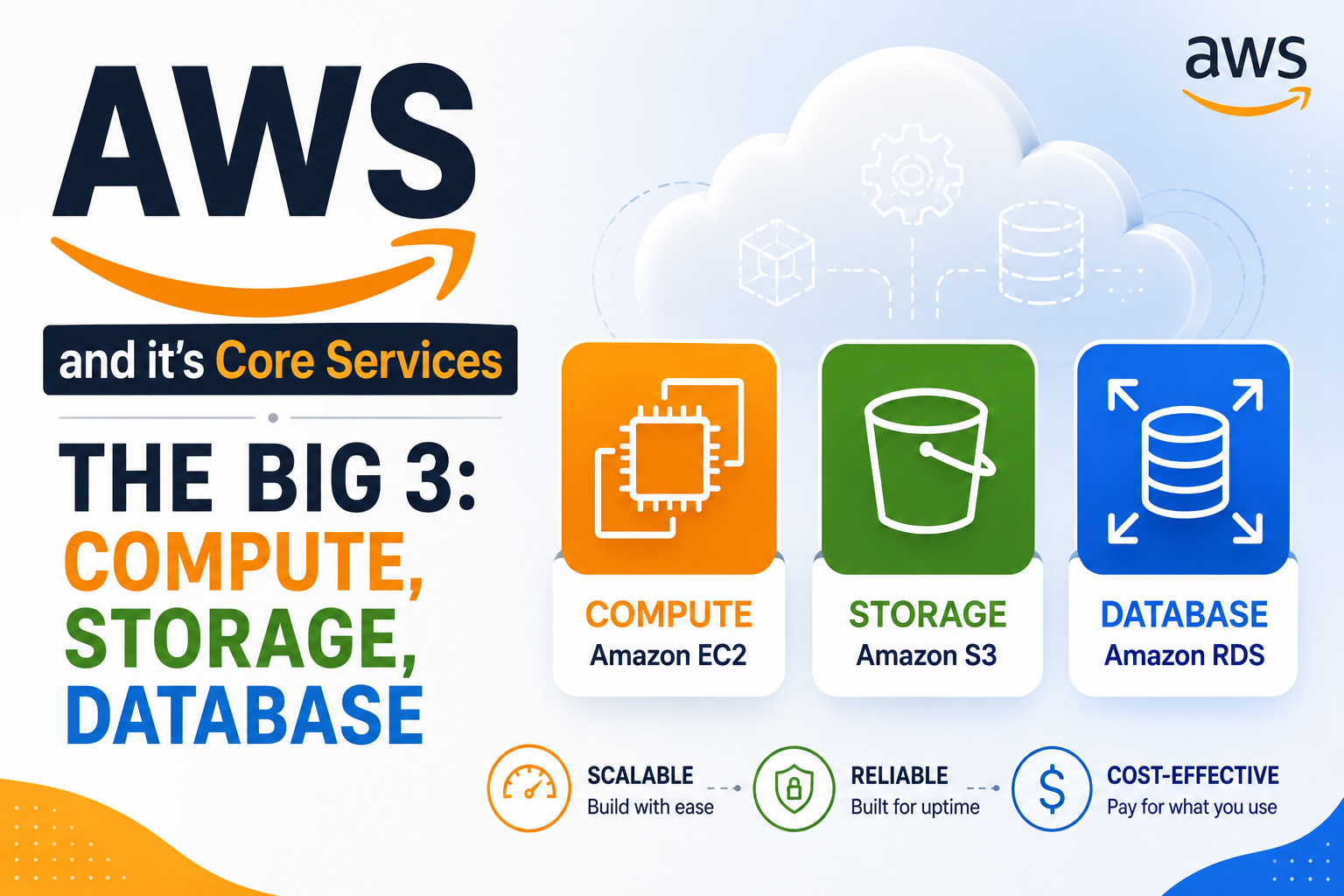
Amazon Web Services mein hundreds of services hain, but teen services har jagah dikhengi, chahe aap beginner ho, experienced ho, ya interview ki prep kar rahe ho. EC2, S3, aur RDS ko "The Big 3" kaha jaata hai kyunki almost every AWS architecture inhi ke around banti hai.
Note that - This blog is in combination of English and Hindi so that even begineers can also understand it.
The main goal of this blog is to deeply understand these Big-3 Services such that you will be capable enough to explain them to anyone and it will be beneficial to you from an interviews perspective.
Chalo shuru karte hain.
Part 1: EC2 (Elastic Compute Cloud) — The Virtual Server
What is EC2?
Amazon EC2 ek web service hai jo resizable virtual servers (instances) provide karti hai cloud mein.
Simple samjho: EC2 matlab "virtual machine on rent." Aapko physical hardware nahi khareedna padta, server room mein AC nahi lagwana padta, maintenance nahi karni padti. Aap bas AWS se ek virtual computer "lease" kar lete hain.
Major Benefit: EC2 gives you complete control over your computing resources such as CPU, memory, storage, and networking sab aap choose karte hain.
Core Components of EC2
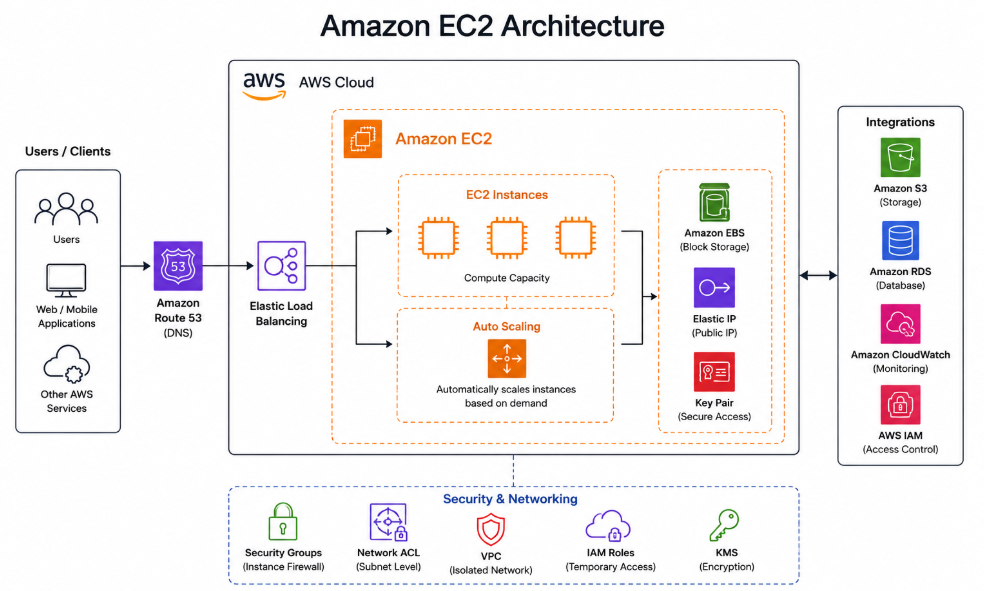
Instance Types: Different families for different workloads. General-purpose (t3) for basic web servers, Compute-optimized (c5) for heavy processing, Memory-optimized (r5) for databases, Storage-optimized (i3) for large data workloads. Sahi type choose karna cost aur performance dono affect karta hai.
AMIs (Amazon Machine Images): Pre-configured templates for instances. Linux, Windows, ya custom images, jitni baar instance launch karo utni baar AMI se boot hota hai.
Auto Scaling Groups: Automatically adjusts instance count based on demand. Traffic spike aayi toh instances badh jayenge, raat ko traffic kam hai toh scale down ho jayenge, paisa bachta hai.
Elastic Load Balancer (ELB): Distributes traffic across multiple instances. Ek instance down hua toh traffic doosre ko bhej do, high availability ke liye must hai.
EC2 Purchase Options (Interview Gold)
Yeh part interview mein "cost optimization" ke questions mein aapko alag karega.
On-Demand: Best for short-term workloads, testing, unknown workloads. 0% savings, pay by hour/second. No commitment required.
Reserved Instances: Best for steady-state production with 1-3 years commitment. Up to 72% savings. Ideal for predictable workloads.
Spot Instances: Best for fault-tolerant batch jobs that can be interrupted. Up to 90% savings. Perfect for data processing, image rendering, CI/CD pipelines.
Savings Plans: Flexible commitment across EC2, Fargate, and Lambda. Up to 66% savings. More flexible than Reserved Instances.
💡 Interview Question: "Your startup needs to run a batch processing job at 2 AM every night. The job can be interrupted and retried. Which EC2 purchase option would you choose?"
Answer: Spot Instances. They offer up to 90% cost savings and are perfect for interruptible workloads because the job is fault-tolerant and can resume from where it left off.
Real-World Example
Imagine aap ek photo-sharing website host kar rahe ho. Initially load kam hai so ek t3.micro instance kaafi hai. Users badhe toh Auto Scaling Group lagao jo peak hours mein naye instances launch kare. ELB traffic distribute kare. Cost? ap-south-1 (Mumbai) region mein ek t3.small/t3.medium instance roughly ₹2,500 - ₹8,000 per month aata hai.
Part 2: S3 (Simple Storage Service) — The Object Storage
What is S3?
Amazon S3 is object storage — basically, cloud mein files (objects) store karne ki jagah.
> Simple samjho: S3 matlab "Google Drive for developers"; but much more powerful. It's not just storage; it's highly scalable, secure, and integrates with almost every AWS service.
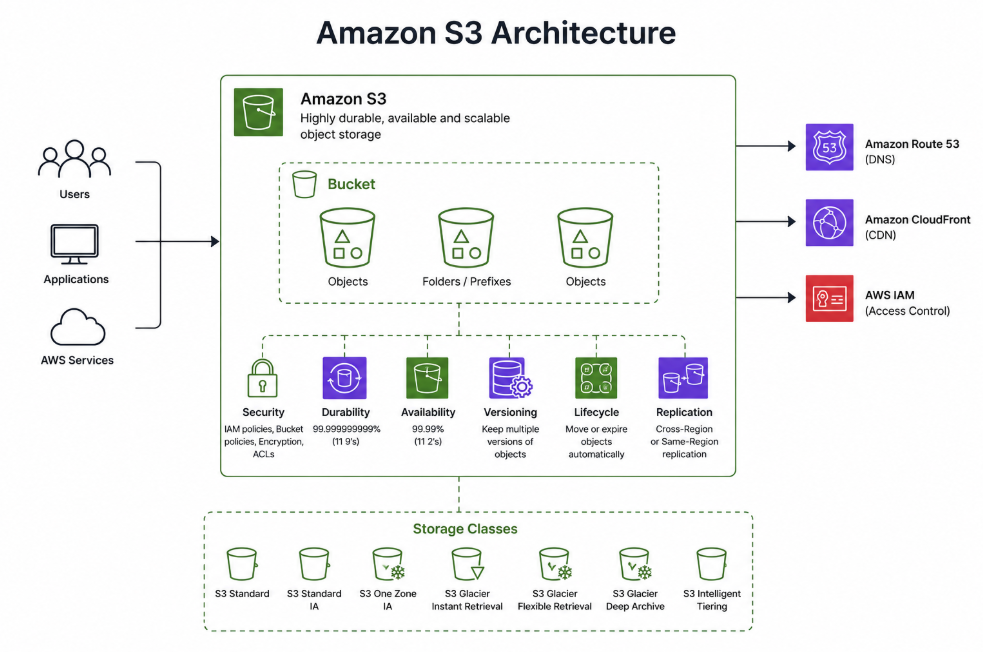
The Insane Durability Promise: S3 is designed for 99.999999999% (11 nines) durability. Matlab agar 10 million objects store kiye toh ek object har 10,000 saal mein shayad kho jaaye. That's not a typo, it really is that reliable.
S3 Storage Classes
S3 Standard: For frequently accessed data. Highest cost, no retrieval fees.
S3 Intelligent-Tiering: For unknown or changing access patterns. Automatic tiering so no manual effort needed.
S3 Standard-IA: For infrequently accessed data but need quick retrieval. Lower cost but includes retrieval fee.
S3 Glacier Instant Retrieval: For archive data with millisecond retrieval. Lower cost than Standard-IA.
S3 Glacier Deep Archive: For long-term compliance archive. Cheapest option (~₹0.08/GB/month). Best for data accessed once or twice a year.
💡 Interview Question: "Your company has 10 years of financial records that must be retained for compliance, but accessed only once a year. Which S3 storage class would you use?"
Answer: S3 Glacier Deep Archive as it's the cheapest and perfect for long-term compliance data. For extra security, enable Object Lock (WORM mode) to make data immutable.
Important S3 Features
Versioning: Maintains multiple versions of an object. Prevents accidental deletion as old versions remain even if you delete the current one.
Lifecycle Policies: Auto-moves objects between storage classes. Reduce costs automatically as it moves older data to cheaper tiers.
Pre-signed URLs: Temporary access to private objects. Share private files securely for a limited time.
Cross-Region Replication: Copies objects to another region. Disaster Recovery takes place if one region goes down, data is safe elsewhere.
Real-World Example
Photo-sharing app mein S3 se user-uploaded images store karte hain. Lifecycle rule set karo: images older than 30 days move to S3 Standard-IA, older than 1 year move to Glacier Deep Archive. Isse storage cost ~70% kam ho jati hai. CloudFront in front of S3 laga do to cache images globally and reduce latency.
Part 3: RDS (Relational Database Service) — The Managed Database
What is RDS?
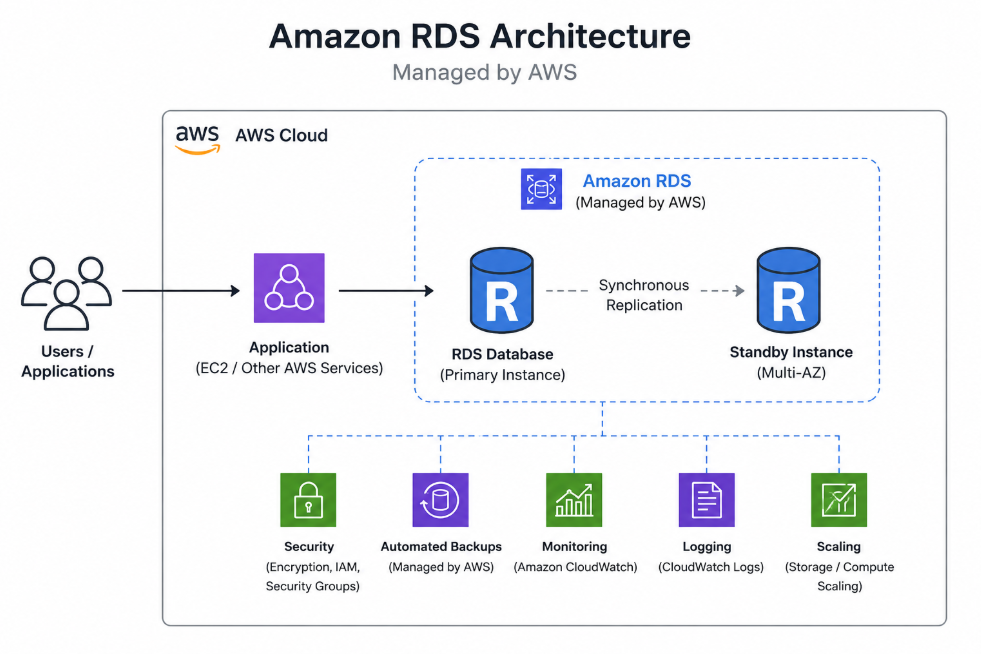
Amazon RDS is a managed relational database service that supports MySQL, PostgreSQL, Oracle, SQL Server, and MariaDB.
Simple samjho: RDS matlab "database that AWS manages for you." AWS handles patching, backups, replication, and failover. Aap bas queries optimize karte hain.
Major Benefit: Instead of running MySQL on EC2 and managing everything yourself, RDS automates backups, patching, and monitoring. Time bachta hai, headache kam hoti hai.
Architecture of AWS managed RDS👆🏻
RDS vs. Aurora vs. DynamoDB — When to Use What?
Yeh comparison interview mein sabse zyada puchha jaata hai.
RDS: Relational (SQL) data model. Supports JOIN operations. Single primary for writes (scale up). Failover time 60-120 seconds. Best for standard relational workloads with moderate scale.
Aurora: Relational (SQL) data model. Supports JOIN operations. Single primary but larger max instances. Failover under 30 seconds. Best for high-availability relational workloads that need better performance.
DynamoDB: NoSQL (Key-Value/Document) data model. No JOIN support. Horizontal scaling (scale out). Multi-AZ by default. Best for high-throughput key-based access with predictable performance.
💡 Interview Question: "Your e-commerce application needs ACID transactions and complex JOINs. Which database would you choose?"
Answer: RDS or Aurora. DynamoDB doesn't support JOINs or ACID transactions (except limited support). For production, choose Aurora for faster failover and better availability.
Real-World Example
E-commerce app mein RDS (PostgreSQL) use karte hain for customer accounts, orders, and inventory. Multi-AZ enable karte hain for high availability. Flash sales ke time read replicas handle the surge in query traffic. A typical db.t3.micro instance costs approximately ₹2,000 - ₹3,000/month.
How These Three Services Work Together
The Classic 3-Tier Architecture:
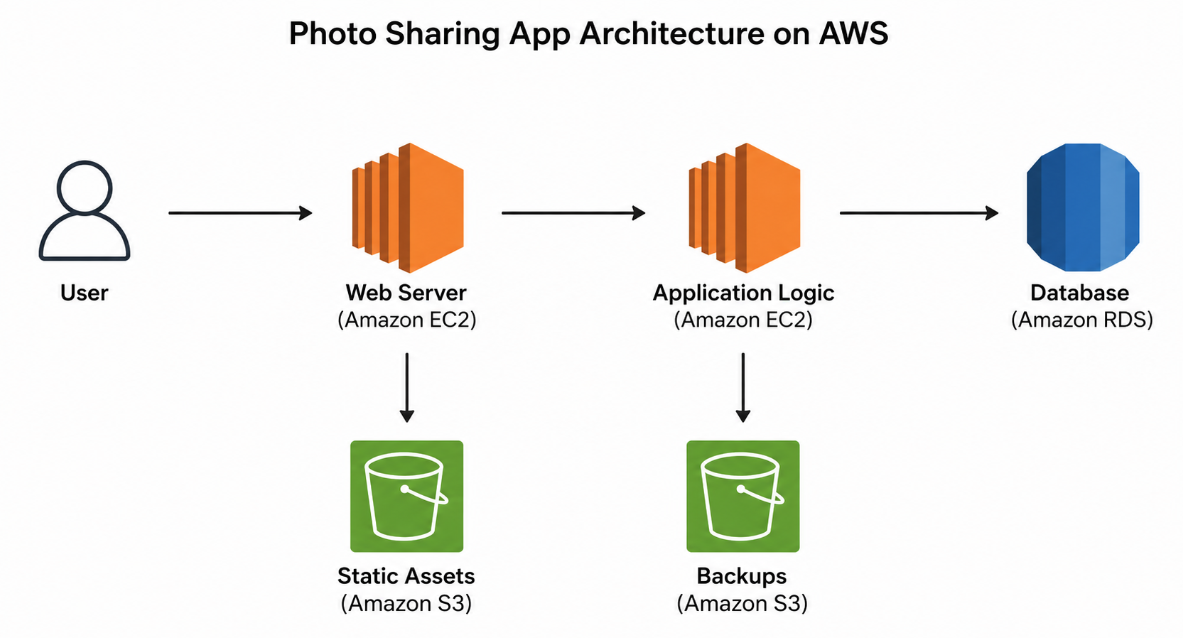
Example — Your Photo-Sharing App:
-
EC2 hosts the web server and application logic
-
S3 stores user-uploaded images and static assets
-
RDS stores user profiles, photo metadata, and comments
Books & Learning Resources
Recommended Books
-
AWS Certified Solutions Architect Study Guide (SAA-C03) by Gyan Prakash Upadhyay
-
Complete SAA-C03 exam prep with architecture patterns and tradeoffs
-
Great for building practical knowledge and interview prep
-
Available on Amazon and local bookstores, available in one github repo, try to find it!
-
Online Documentation
-
AWS Official Documentation
-
URL: docs.aws.amazon.com
-
Most authentic and detailed source for EC2, S3, RDS
-
Includes best practices, API references, and tutorials
-
Always updated with latest features
-
-
AWS Well-Architected Framework
-
Learn design principles for reliable, secure, cost-optimized architectures
-
Includes whitepapers and best practice guides
-
Essential for interview preparation
-
CloudWebSchool
-
Side-by-side comparisons (S3 vs EBS vs EFS, RDS vs Aurora vs DynamoDB)
-
Good for quick reference and revision
-
Simplified explanations for complex topics
Practice Platforms
-
GitHub — mastering-aws-interviews
-
Beginner/Intermediate/Advanced Q&A with explanations
-
Community-driven questions and answers
-
Great for understanding what interviewers actually ask
What's Coming in Blog 2?
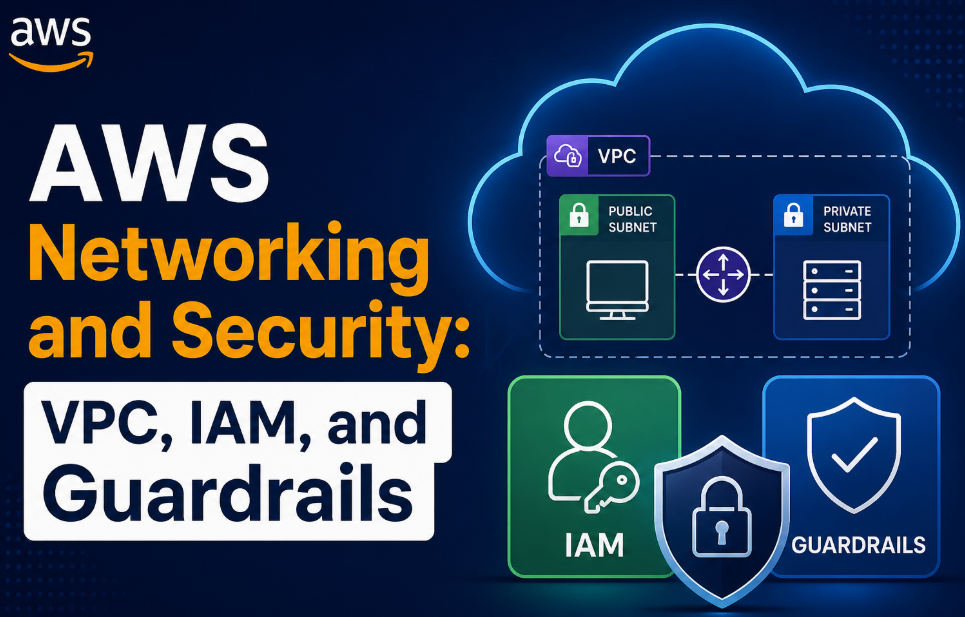
Title: AWS Networking & Security — VPC, IAM, and Beyond
We'll cover:
-
VPC deep-dive: Subnets, Route Tables, NAT Gateways, Internet Gateways
-
VPC Peering vs. Transit Gateway
-
IAM: Policies, Roles, and the Principle of Least Privilege
-
Security Groups vs. NACLs — when to use which
-
Interview Q&A on VPC design and security best practices
💬 Comment below:
-
Which of these services (EC2/S3/RDS) do you use the most in your current role?
-
What's the most challenging AWS question you've faced in an interview?
-
Any specific topic you want me to cover deeper in Blog 2?